
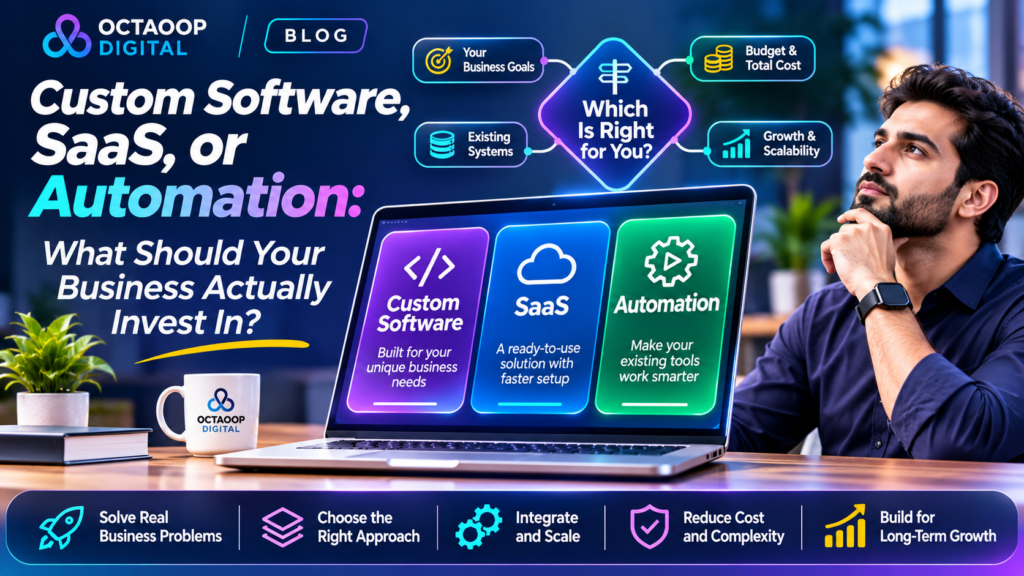
Custom Software, SaaS, or Automation: What Should Your Business Actually Invest In?
There’s a particular moment in a growing business when the software that once made everything easier starts getting in the way.
It doesn’t happen overnight.
At first, a spreadsheet is perfectly adequate for managing customers. A few online forms handle enquiries. A popular CRM keeps track of sales. An accounting application manages invoices, and perhaps someone has connected a couple of those systems using an automation tool.
Everything works well enough.
Then the company grows.
More customers arrive. More people need access to information. Departments develop different ways of working. Employees spend increasing amounts of time copying information between systems.
Eventually, someone says the words that launch a thousand software projects:
“We need our own system.”
Maybe they do.
But perhaps they don’t.
A custom application could be the right investment. So could a better-configured SaaS product, a few carefully designed integrations, or a modest automation project that eliminates the original problem without replacing everything else.
The difficulty is knowing which option makes sense.
The best technology decision isn’t necessarily the most sophisticated one. It’s the one that solves the business problem without creating more cost, complexity, and responsibility than necessary.
That is the decision we’ll explore.
First, Understand What You’re Actually Choosing
The terms SaaS, custom software, and automation are frequently used together, but they describe different approaches.
Buying an Existing SaaS Product
Software as a Service (SaaS) refers to applications delivered as an ongoing service, typically through a subscription.
Examples include customer management systems, accounting software, project management platforms, ecommerce tools, and collaboration applications.
The software provider usually manages the application’s core infrastructure, development, and updates.
Your company pays to use the service, subject to its licensing terms.
For common business requirements, this can be an excellent arrangement.
You benefit from a product that has already been developed, tested, and improved across numerous customers.
You don’t have to build every feature yourself.
Building Custom Software
Custom software is developed around the requirements of a particular organization or product.
That could be an internal operations platform, a customer portal, a booking system, a mobile application, or a specialized business management solution.
It can also be a commercial SaaS product that your company intends to sell to other customers.
That distinction matters: buying SaaS and building a SaaS product are two very different investment decisions.
With custom development, you have greater influence over functionality, architecture, integrations, and future changes.
You also take on more responsibility for development, security, maintenance, and operating costs.
Automating Existing Systems
Automation connects activities so that tasks happen with less manual intervention.
For example, when someone submits a website enquiry, an automated workflow might create a CRM record, notify the relevant team, assign responsibility, and schedule a follow-up task.
The business hasn’t necessarily built a new CRM.
It has made its existing systems work together.
Automation may use native platform features, integration services, APIs, custom backend services, or AI-assisted workflows.
Often, it provides a sensible middle ground between buying more software and commissioning a complete development project.
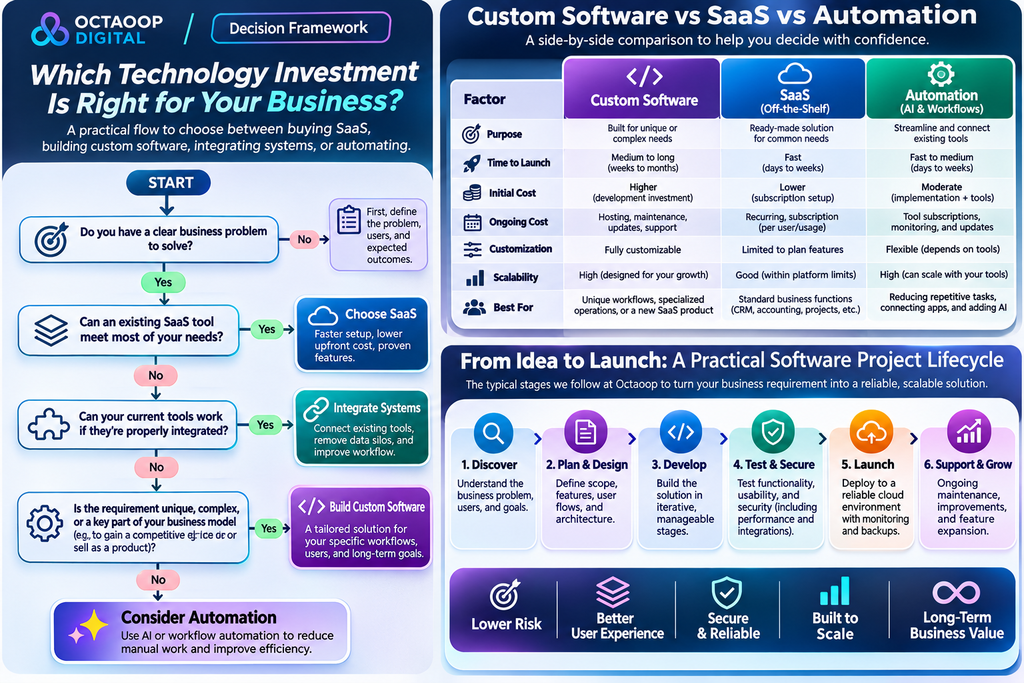
The Decision at a Glance
| Approach | Usually worth considering when | Main consideration |
|---|---|---|
| Existing SaaS | The requirement is common and a suitable product already exists | Subscription costs, limits, and vendor dependency |
| SaaS with integrations | Existing tools cover most needs but don’t communicate adequately | Integration reliability and data consistency |
| Custom software | The workflow is distinctive or requirements exceed practical platform limits | Development and long-term ownership costs |
| Custom SaaS product | You intend to sell software to multiple customers | Product-market fit, architecture, security, and ongoing operations |
| AI or workflow automation | Repetitive tasks can be reduced without replacing existing systems | Accuracy, permissions, monitoring, and human oversight |
These options aren’t mutually exclusive.
A business might use a commercial CRM, maintain a custom customer portal, and connect both through automated workflows.
That combination may be more sensible than attempting to replace every existing application.
When Buying Software Is the Better Decision
Let’s start with an uncomfortable truth for companies selling software development services:
Sometimes, the customer shouldn’t build anything.
Consider a small professional services firm that needs to manage appointments, send invoices, track enquiries, and maintain customer records.
Those requirements are not particularly unusual.
Numerous established products already provide these functions.
Building a custom system from scratch may require considerable investment without delivering a meaningful advantage over existing software.
A suitable off-the-shelf product could be deployed more quickly and maintained with less internal technical responsibility.
The same logic applies to many everyday business functions.
Accounting, email, file storage, collaboration, and standard project management rarely justify custom development unless a company has unusual requirements.
Before commissioning software, examine what already exists.
A useful evaluation should consider the features you actually need, the total licensing cost, integration capabilities, data export options, support quality, security responsibilities, and the practical limits of customization.
There’s no prize for reinventing an application that already does the job well.
The business benefits from solving the problem, not from owning the most code.
When Integration Is Smarter Than Replacement
Now consider a different situation.
A company has a functioning website, a CRM, an accounting application, and an internal operations tool.
Individually, each system performs well.
The problem is that information doesn’t move reliably between them.
Customer details have to be entered more than once. Sales teams cannot see the latest payment status. Operations staff receive incomplete requests.
Management starts considering a custom platform that would replace everything.
But the existing applications may not be the problem.
The missing connections are.
A carefully designed integration could address the issue at a fraction of the disruption associated with replacing the entire software environment.
For instance, a secure API integration could transfer an approved order from the ecommerce platform into the appropriate operations system.
A webhook could notify a CRM when a payment has been completed.
A scheduled synchronization could update records between systems, with monitoring to identify failures.
The important work isn’t simply moving data.
It involves deciding which system is authoritative, how records are matched, what happens when a request fails, and how errors are detected.
A good integration needs more than a working connection
Suppose an application sends the same order twice because the original request times out.
Does the receiving system create two orders?
Or can it recognize that the operation has already been processed?
That is an example of why idempotency matters in integration design.
Similarly, integrations should account for authentication, permissions, rate limits, retries, logging, and how sensitive information is handled.
These details may sound technical, but they have direct operational consequences.
An integration that works during a demonstration but fails silently during normal business activity is not a dependable solution.
Before replacing software, investigate whether the real problem is the way existing systems communicate.
When Custom Software Becomes Worth the Investment
Custom development becomes more compelling when existing products cannot reasonably accommodate an important business requirement.
Imagine a property development business managing multiple housing projects.
Each project has different property inventory, customer installment schedules, payment records, invoices, and administrative processes.
Standard tools may handle individual parts of that operation.
But integrating them into a coherent workflow could require extensive customization or repeated manual intervention.
At that point, a purpose-built platform may offer meaningful value.
The custom system might connect property availability with sales reservations, installment schedules, invoice generation, and management reporting.
Different employees could have access based on their responsibilities.
The organization could maintain a consistent view of information across departments.
The investment would be justified not because the company wanted custom software, but because the business requirements warranted it.
Other situations where custom development may make sense
Customer and partner portals: A company needs clients, vendors, or partners to access information and complete tasks through a controlled interface.
Complex operational workflows: Existing tools cannot support industry-specific approval processes, calculations, or business rules.
Specialized ecommerce applications: A retailer needs unusual ordering, pricing, fulfillment, or product configuration capabilities.
Commercial software products: A founder has identified a market opportunity and wants to develop a product that customers will pay to use.
Data-intensive operations: The business must process, synchronize, and manage large volumes of information under defined performance and security requirements.
Legacy modernization: An important existing application has become difficult to maintain or extend, and a phased modernization offers a reasonable path forward.
In each case, the justification should be specific.
“We want a modern system” is not enough.
“We need customers to configure an order using rules our current platform cannot support, while synchronizing inventory across three warehouses” is a much more useful starting point.
Don’t Build a SaaS Platform Before Understanding the Product
Building a software product to sell is different from developing an internal business tool.
A founder considering a subscription platform has to answer questions about more than software functionality.
Who will use the product?
What problem is important enough for them to pay to solve?
How will customers discover it?
Why would they choose it over established alternatives?
What features are essential for the first release?
How will the company support users after launch?
It’s tempting to begin with an ambitious feature list.
An AI assistant. A comprehensive dashboard. Mobile applications. Advanced analytics. Multiple integrations. Team management. Dozens of settings.
But every additional feature creates design decisions, development work, testing requirements, and ongoing maintenance.
A minimum viable product, or MVP, should focus on validating the product’s most important assumptions.
That doesn’t mean the software should be unreliable or insecure.
It means the initial scope should be deliberately limited.
For example, a founder developing a subscription-based appointment management product might first release reliable scheduling, basic account management, notifications, and billing.
More sophisticated features can follow once actual usage demonstrates their value.
The advantage of phased development is not simply lower initial cost.
It’s the opportunity to learn before committing to an unnecessarily complicated product.
Why Software Architecture Matters Before the First Line of Code
Software architecture is often discussed as if it concerns only developers.
In reality, architectural decisions affect cost, security, performance, and how easily a business can change its product later.
Consider a new SaaS platform.
Will it support one organization or many independent customers?
Will users require different roles and permissions?
How will data belonging to different customers be separated?
Does the application need real-time communication?
Will it process large numbers of background tasks?
What happens if a third-party service becomes unavailable?
These questions influence the eventual technical design.
Modular Monolith or Microservices?
Microservices are sometimes presented as the natural choice for ambitious software projects.
They can be useful.
A distributed architecture allows separate services to be developed, deployed, and operated according to their responsibilities.
But that flexibility introduces additional complexity.
Teams must manage communication between services, deployments, monitoring, data consistency, and failure handling.
For a relatively small product, a well-designed modular monolith may be simpler to build and maintain.
A modular monolith keeps major parts of the application within one deployable system while preserving clear internal boundaries.
There is no universal rule that microservices are better.
The correct decision depends on expected scale, team capacity, deployment requirements, and operational complexity.
Good architecture gives the business enough room to grow without forcing it to pay for complexity it does not yet need.
Cloud Engineering: Hosting Is Only the Beginning
Launching a production application involves more than uploading code to a server.
Businesses need to consider how the system will operate under normal conditions, during increased demand, and when something goes wrong.
That includes deployment, databases, backups, permissions, monitoring, security updates, recovery procedures, and ongoing costs.
Services from AWS, Google Cloud, and Microsoft Azure provide numerous ways to host applications.
Choosing the appropriate combination requires understanding the workload.
For example, a simple internal application and a multi-tenant SaaS platform processing millions of records have very different requirements.
One may need a modest hosting arrangement.
The other may benefit from containerized services, background job processing, managed databases, caching, and infrastructure automation.
Why cloud costs deserve ongoing attention
Cloud expenses can grow for reasons that are not immediately obvious.
Unused resources may remain active. Databases may be overprovisioned. Logs may accumulate. Applications may generate unnecessary network traffic or execute inefficient queries.
A system that was appropriate when launched may become unnecessarily expensive as its usage changes.
Cloud cost optimization should therefore consider architecture, resource utilization, application behavior, and reliability requirements.
Cutting costs without understanding those dependencies can create new problems.
AWS’s Well-Architected Framework provides a useful reference for evaluating cloud workloads across operational excellence, security, reliability, performance efficiency, cost optimization, and sustainability.
AWS updated this framework in November 2026, reinforcing the importance of examining architecture as an ongoing operational responsibility rather than a one-time deployment decision.
Read the AWS Well-Architected Framework
Where AI Automation Fits Into the Decision
AI has created another possibility for businesses considering software investment.
Instead of building a full application or buying yet another subscription, could an AI-assisted workflow help employees complete the task?
Sometimes, yes.
Consider a hospitality business that receives repetitive guest questions.
Customers regularly ask about check-in times, parking, property access, and booking policies.
A properly designed knowledge assistant could retrieve approved information and answer common questions.
More complicated requests could be transferred to a human employee.
That may reduce repetitive work without replacing the booking platform.
Now consider a business receiving documents that must be reviewed and categorized.
An AI-assisted system could extract relevant information, suggest classifications, and prepare records for human approval.
The opportunity is useful, but the boundaries matter.
An AI assistant should not receive unlimited authority
If an AI system can access customer records, change bookings, send messages, or initiate payments, the business must define what it is allowed to do.
It should be clear which actions are automated, which require confirmation, and what happens when the system is uncertain.
A customer-facing assistant should also have a reliable way to escalate requests it cannot handle.
The US National Institute of Standards and Technology provides guidance for managing risks associated with generative AI systems.
OWASP also documents security risks in large language model applications, including prompt injection and excessive agency.
These are important considerations when AI is connected to operational software.
Explore NIST’s Generative AI Risk Management Profile
Review OWASP’s LLM Application Security Guidance
The lesson is not to avoid AI.
It’s to use it where the business case is clear and the system can be operated responsibly.
The Cost Nobody Includes in the Original Software Quote
When comparing software options, businesses often focus on the initial price.
A SaaS subscription costs a certain amount per month.
A custom application requires a development quote.
An integration may carry a one-time implementation fee.
But those figures rarely describe the complete cost of ownership.
For a realistic comparison, consider the expenses involved over several years.
| Cost area | Existing SaaS | Custom software |
|---|---|---|
| Initial implementation | Configuration and onboarding | Discovery, design, development, testing |
| Recurring charges | Subscription and usage fees | Hosting, maintenance, infrastructure |
| Integrations | Native connectors or custom work | API development and upkeep |
| Changes | Subject to vendor features and limits | Requires development capacity |
| Security responsibilities | Shared with provider | Greater responsibility for owned application |
| Support | Vendor support terms | Internal team or contracted support |
| Expansion | Plans, seats, and usage charges | Additional features and infrastructure |
| Exit or migration | Export capabilities and contractual limits | Code, infrastructure, documentation, data transfer |
This comparison isn’t intended to make custom software appear cheaper or more expensive.
It shows why initial prices can be misleading.
A low-cost subscription may become expensive when hundreds of staff members require licences.
A custom system may avoid some licensing limitations but introduce significant maintenance responsibilities.
An integration that seems inexpensive initially may require ongoing attention whenever connected platforms change their APIs.
Calculate total cost of ownership
A practical three-year comparison should consider:
Initial implementation + licensing + infrastructure + integrations + maintenance + support + upgrades + eventual migration costs.
Then compare those costs against the expected business value.
Will the investment reduce manual work?
Enable a service the company could not previously provide?
Improve reliability?
Support a new revenue model?
Reduce operational errors?
The answers matter more than whether the solution is described as custom, enterprise-grade, or AI-powered.
Three Business Scenarios That Help Explain the Choice
The following examples are hypothetical. They illustrate how a business might approach the decision.
Scenario 1: A Growing Service Company
A professional services company has 20 employees and wants better appointment management, customer records, and internal task assignment.
Its requirements are largely standard.
Likely starting point: Evaluate established SaaS products and their integration capabilities.
A custom platform might be unnecessary unless the company has unusual requirements.
Scenario 2: A Multi-Location Operations Business
A company manages staff, bookings, assets, payments, and customer communication across several locations.
The information is spread across applications, and employees frequently repeat data entry.
Likely starting point: Map the workflows and assess integrations before considering custom development.
If important processes cannot be supported reliably, a targeted custom application may be justified.
Scenario 3: A Founder Launching a Subscription Product
An entrepreneur has identified a specific problem affecting an underserved customer group and wants to sell a web-based subscription product.
No suitable existing application matches the intended product experience.
Likely starting point: Validate demand, define a focused MVP, and scope custom SaaS development.
Cloud architecture, subscriptions, access controls, customer onboarding, and support must be considered from the beginning.
Notice that the technology decision changes with the business problem.
That is exactly how it should work.
What a Well-Managed Software Project Should Look Like
A useful software engagement shouldn’t begin with a developer asking which programming language the client prefers.
Most business owners shouldn’t have to make that decision.
The conversation should begin with users, workflows, commercial requirements, existing systems, constraints, and intended outcomes.
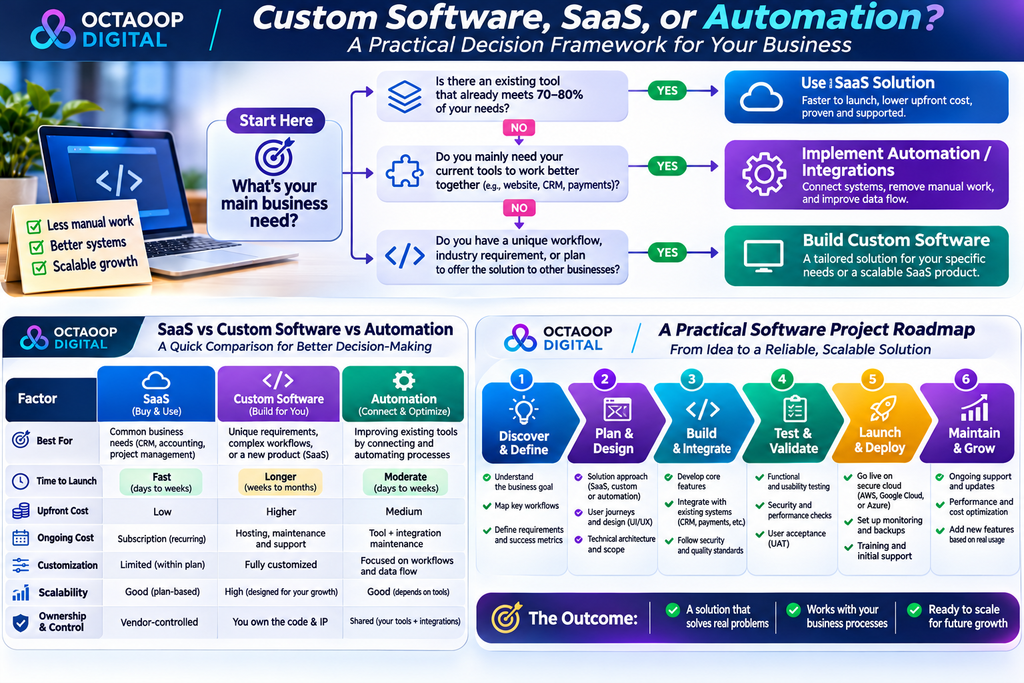
From there, the project can move through a defined lifecycle.
Discovery and Scope
The team identifies what needs to be built, what already exists, which integrations are necessary, and how success will be evaluated.
Important assumptions and technical risks should be recorded.
Product and Architecture Design
The solution is translated into user journeys, interface plans, data models, architectural decisions, and delivery milestones.
For a customer-facing product, usability and accessibility should be considered early.
Development and Integration
Approved features are implemented and connected to the necessary services.
The implementation may include frontend applications, backend APIs, databases, payment integrations, messaging systems, or other components.
Testing and Launch
The system is evaluated against agreed acceptance criteria.
Testing should cover essential functionality, permissions, error handling, relevant security requirements, and production readiness.
Deployment should include appropriate monitoring, backup, and recovery planning.
Maintenance and Improvement
After launch, the business needs a plan for defects, security updates, operational incidents, and future enhancements.
The support arrangement should clearly define responsibilities and service commitments.
Launch day is a milestone.
It is not the end of the software’s life.
NIST’s Secure Software Development Framework offers additional guidance on integrating security practices into the development lifecycle.
Software Should Support the Business Beyond the Application
A software product can be technically excellent and still fail commercially.
A founder might launch a capable SaaS platform without understanding how customers will discover it.
An ecommerce company might develop sophisticated ordering functionality but overlook how products are presented to buyers.
A service business may introduce an excellent CRM without establishing a consistent customer acquisition process.
These are reminders that engineering and business development influence one another.
For customer-facing products, useful considerations include:
- How potential customers discover the product.
- Whether the website clearly explains its value.
- How people sign up or request a demonstration.
- Whether onboarding is understandable.
- Which actions indicate successful adoption.
- What information is needed to improve the product.
- How customer feedback reaches the product team.
This is where marketing, content, design, analytics, and software engineering can benefit from coordination.
A SaaS product may require SEO and content to reach relevant audiences, branding and creative work to explain its positioning, and a clear website to support conversion.
A business application may need analytics integrations or CRM workflows to connect its functionality with wider operations.
The point is not that every software project requires every marketing service.
It is that product decisions should account for the business environment in which the software will operate.
What to Ask Before Hiring a Software Development Partner
You don’t need to understand every programming framework to evaluate a development proposal.
But you should expect clear answers to important business and technical questions.
Before committing, establish what is included in the scope, how changes will be managed, what the delivery milestones represent, and who is responsible for testing.
Ask how the application will be hosted and how its operating costs will be managed.
Clarify data ownership, intellectual property, source-code access, third-party licences, and whether you will receive technical documentation.
Understand what happens after launch.
Will maintenance be included?
Who is responsible for security updates?
How will incidents be handled?
What happens if you want another team to maintain the application in the future?
A credible development partner should be willing to discuss these matters before the agreement is signed.
You should not need to discover ownership or support limitations after the application is already live.
How Octaoop Digital Approaches Software and Technology Projects
Octaoop Digital Agency’s capabilities now extend beyond conventional digital marketing and website development.
Alongside its work in search, paid advertising, content, branding, ecommerce, and marketing technology, Octaoop can help scope projects involving custom software engineering and cloud-based applications.
The engineering offering covers several areas that serve different business requirements.
Custom SaaS and MVP development can support founders building subscription products, customer portals, administrative platforms, or specialized business applications.
AI applications and intelligent automation can support customer assistance, internal knowledge systems, document processing, and appropriate voice or chat integrations.
Cloud engineering and DevOps can help businesses evaluate deployment architecture, infrastructure management, automation, and cloud operating costs.
Web, mobile, and desktop application development supports digital products used across browsers, phones, and desktop environments.
Backend systems and API integrations connect applications, databases, and external services where reliable data exchange is important.
Managed engineering and technical support provides options for continued maintenance, enhancements, and operational assistance under an agreed scope.
The engineering delivery model is intended to support projects from discovery and technical scoping through application development, deployment, and post-launch requirements.
The exact architecture, technology stack, timeline, pricing, and support commitments depend on the project.
For businesses whose requirements also involve customer acquisition or digital communication, Octaoop can consider the relevant marketing and content capabilities alongside the technical work.
That allows a conversation to begin with the actual business requirement rather than an assumption that every client needs the same solution.
Explore Octaoop’s Growth Technology Services
A Practical Checklist Before You Invest
Before purchasing or building software, work through these questions with the people who will actually use the system.
- What problem are we solving? Describe it without naming a software product or technical solution.
- What happens if we do nothing? Establish the cost of the current process, including delays, errors, and missed opportunities.
- Can existing software meet the requirement? Review suitable products and their practical limitations.
- Could integration solve the problem? Investigate whether connecting current systems would remove the need for replacement.
- What must remain under our control? Clarify data ownership, compliance, customization, and infrastructure requirements.
- Who will maintain the solution? Identify responsibility for support, security updates, documentation, and future changes.
- How will we know it was worth the investment? Define the outcomes and evidence that will be reviewed after implementation.
A good answer to these questions can prevent months of unnecessary development.
It can also reveal when a custom platform is genuinely the right choice.
Frequently Asked Questions
Is custom software better than SaaS?
Neither is universally better. Existing SaaS products can offer faster implementation and lower initial development responsibility. Custom software can be appropriate when a business needs distinctive functionality, greater control, or specialized integrations.
When should a business build its own software?
Custom development is worth evaluating when existing products cannot reasonably support an important requirement, when the workflow provides meaningful competitive differentiation, or when the company intends to commercialize the software itself.
Is business automation cheaper than custom software?
It can be, especially when existing applications already perform most required functions. However, automation also has implementation and maintenance costs. Complex integrations may require substantial engineering work.
Can an existing SaaS application connect to custom software?
Often, yes, if the platform offers suitable APIs, webhooks, exports, or integration capabilities. The feasibility depends on the systems, permissions, data requirements, and supported interfaces.
What is an MVP in software development?
A minimum viable product is an initial version designed to deliver a focused set of capabilities and help validate important assumptions about users and demand. It should still meet appropriate standards for reliability, security, and usability.
Does every growing SaaS platform need microservices?
No. A well-structured modular application may be easier to operate than a distributed microservices architecture. The decision depends on workload requirements, team capacity, scale, and operational needs.
Can AI automation replace a complete CRM or business management system?
Not automatically. AI may assist selected tasks, but it does not remove the need for dependable records, permissions, business rules, integrations, and human oversight. The value depends on the workflow.
What should a custom software development quote include?
A useful proposal should explain the scope, deliverables, assumptions, milestones, estimated timeline, testing, infrastructure responsibilities, payment terms, ownership, and post-launch support arrangements.
Can software be developed in stages?
Yes. Phased delivery is often useful when requirements can be prioritized and the business wants opportunities to test, learn, and adjust before committing to additional features.
Build What the Business Needs, Not What Sounds Impressive
There’s a reason software decisions are difficult.
The available options are better, broader, and more accessible than ever before.
A company can subscribe to a mature platform, configure existing tools, integrate multiple systems, build a specialized application, or introduce AI into parts of its operation.
Each option can be right.
Each can also be an expensive mistake when chosen for the wrong reason.
A custom application is not automatically a sign of business maturity.
An AI assistant is not automatically a productivity improvement.
A large cloud environment is not automatically more reliable.
And an inexpensive subscription is not necessarily economical over the long term.
The decision should come back to the people using the system, the work they need to complete, and the value the business expects to create.
Start there.
Understand the problem. Evaluate the alternatives. Be clear about ownership and cost. Build only what deserves to be built.
The smartest technology investment is the one your business will still be glad it made three years from now.
Planning a Software, SaaS, or Automation Project?
Octaoop Digital Agency supports businesses exploring custom applications, SaaS development, AI-powered workflows, software integrations, cloud engineering, and digital growth technology.
If you’re considering a new application—or trying to determine whether your existing systems can be improved—start by explaining the business requirement.
A practical technical discussion can help establish what needs to be built, what can be reused, and which decisions should come first.
Discuss Your Project With Octaoop Digital
References and Further Reading
- AWS — Well-Architected Framework
- NIST — Secure Software Development Framework
- NIST — Generative AI Risk Management Profile
- OWASP — Top 10 for LLM Applications
Editorial note: This article was prepared by the Octaoop Digital team, with AI-assisted support for research, structuring and editorial refinement. Technical explanations and final recommendations should be reviewed against the specific implementation and business requirements before deployment.